Recording payments
Collecting a payment against an invoice, tips, receipts and refunds.
All help topics
Every payment lives in Payments, whether the client paid by card online or handed the crew cash. Recording money by hand is what keeps invoices and reports honest when the payment did not go through DoneWell.
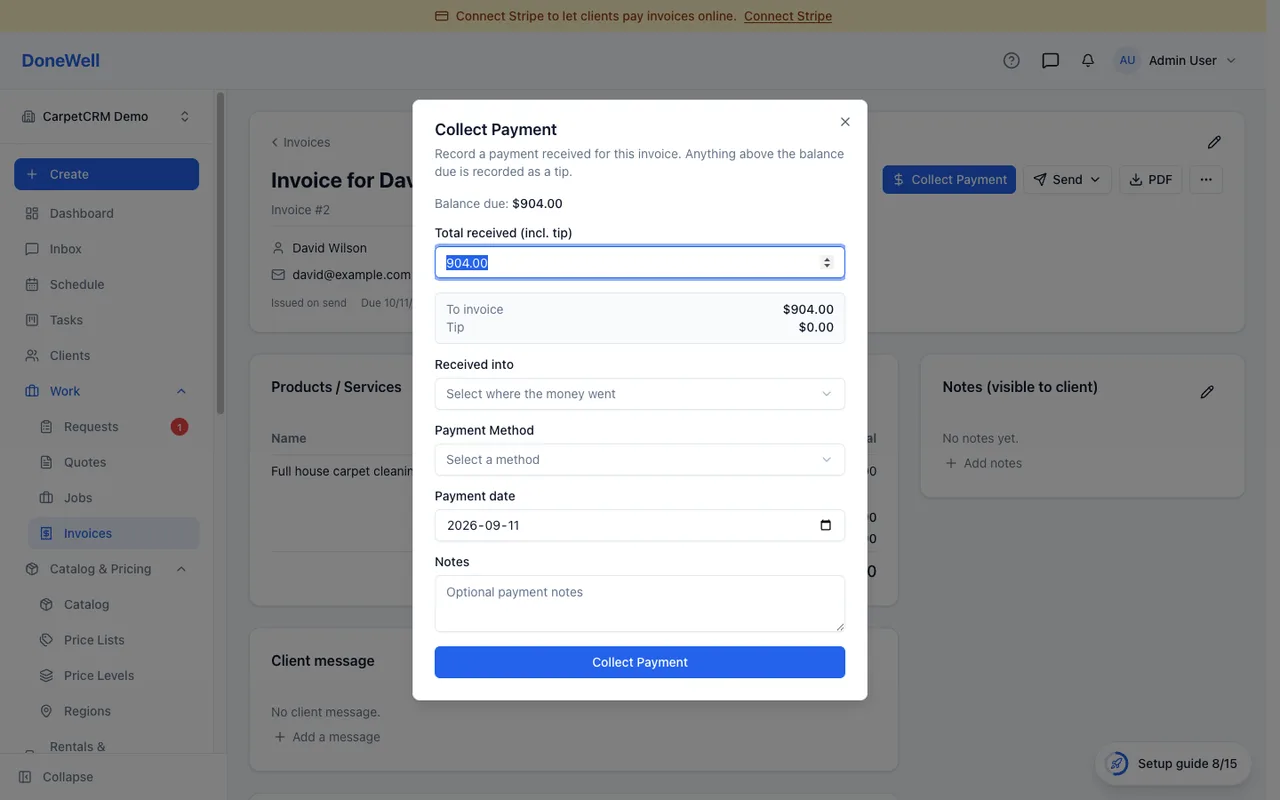
Collect payment
On an invoice with a balance, click Collect payment. Enter the total you received, choose the method (cash, cheque, e-transfer, card on your own terminal — the list is yours to edit under Settings → Payments), where the money went, and the date. A payment can cover part of the balance; the invoice shows Partial until it is settled.
Anything received above the balance due is recorded as a tip. The dialog shows the split as you type. Tips are kept apart from the invoice total, so they never count as revenue against the bill.
Receipts
A receipt goes to the client by email when a payment is recorded, if their address is on file. You can resend it from the payment page.
Wallets
Each payment method can be linked to a wallet — a cash box, a bank account — so the ledger under Finances shows where the money went. This is optional; skip it if you do your bookkeeping elsewhere.
Refunds and corrections
- Refund returns money to the client. Start it from the payment page; a card payment is refunded through Stripe, a hand-recorded one is recorded as returned. The invoice's balance goes back up by the refunded amount.
- Void cancels a payment that was recorded by mistake and never happened. It is for hand-recorded payments only — a card payment that did happen is refunded, not voided.
Payments already paid out to a technician's pay run stay as they were; a later refund is settled in the next pay run instead.
Missing something? Every guide is short on purpose — write to support@donewellapp.com and we will add it.